
- Published on
Building the South Park Range with Ludus

- Name
- Chad Wilson
- @NetPenguins
Series
Delivery And Control
- 01Stagers, Agents, and the Chain Between Them
- 02Building the South Park Range with Ludus
- 03Writing a Stager
- 04Injection Techniques
Before we build anything we need somewhere to test it. This post sets up the range we use throughout Delivery and Control: a small AD environment with a redirector in front of the C2, all provisioned with Ludus.
🎉 Celebrate
Huge shoutout to Bad Sector Labs (Erik) for the amazing work creating Ludus! If you haven't already, come join the conversations in the Ludus Discord
What Ludus Is
Ludus runs on bare metal with Proxmox underneath. You write a YAML config, run a deploy, and it handles provisioning, Windows domain setup, domain joins, firewall rules, DNS, and Ansible role execution.
A few things it gives you:
- Repeatable deploys. The config is a file. Starting over is one command.
- Snapshots. Deploy, snapshot, detonate a payload, roll back, iterate. Rebuilding a domain every time you test something is not viable.
- Roles. Ansible Galaxy roles you reference in the config get installed and run during deploy. This range uses
netpenguins.ludus_redirectorto configure Apache on the redirector VM automatically. - Network segmentation. VLAN firewall rules live in the same config as the VMs.
Installation
Install guide is at docs.ludus.cloud. Needs a dedicated bare-metal host with virtualization extensions, not a VM.
Come back once this returns output:
ludus range list
Roles
This range uses netpenguins.ludus_redirector. It configures Apache with mod_rewrite to proxy specific URI paths to the Kali C2.
Install the role before deploying:
ludus ansible role add netpenguins.ludus_redirector
Docs for the role system, writing your own, and what community roles exist: docs.ludus.cloud/docs/configuration/roles.
Range Layout
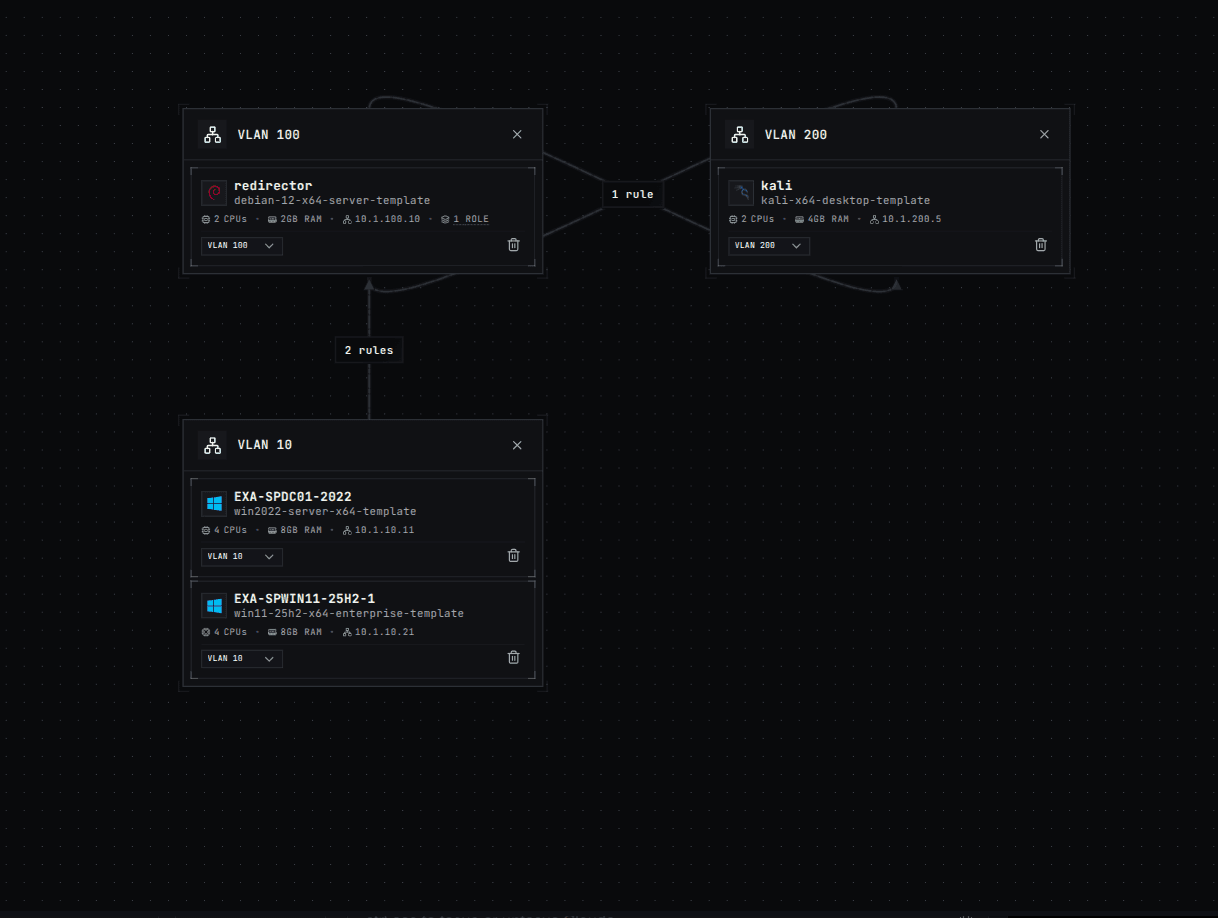
Four VMs across three VLANs:
| Hostname | Role | VLAN | IP |
|---|---|---|---|
| SPDC01-2022 | Domain Controller (Server 2022) | 10 | 10.X.10.11 |
| SPWIN11-25H2-1 | Workstation (Windows 11, domain joined) | 10 | 10.X.10.21 |
| REDIRECTOR | Apache redirector (Debian 12) | 100 | 10.X.100.10 |
| KALI | C2 (Kali) | 200 | 10.X.200.5 |
X is the second octet Ludus assigns to your range.
Network rules:
- Targets (VLAN 10) hit the redirector on 80 and 443 only. No direct access to Kali.
- Redirector and Kali talk freely in both directions.
- Everything else drops.
The redirector gets DNS rewrites redir.ludus and *.redir.ludus. Kali gets c2.ludus and *.c2.ludus. Use the hostnames in your configs instead of hardcoded IPs.
The Config
# yaml-language-server: $schema=https://docs.ludus.cloud/schemas/range-config.json
ludus:
  - vm_name: "{{ range_id }}-SPDC01-2022"
    hostname: "{{ range_id }}-SPDC01-2022"
    template: win2022-server-x64-template
    vlan: 10
    ip_last_octet: 11
    ram_gb: 8
    cpus: 4
    windows:
      sysprep: false
    domain:
      fqdn: southpark.com
      role: primary-dc

  - vm_name: "{{ range_id }}-SPWIN11-25H2-1"
    hostname: "{{ range_id }}-SPWIN11-25H2-1"
    template: win11-25h2-x64-enterprise-template
    vlan: 10
    ip_last_octet: 21
    ram_gb: 8
    cpus: 4
    windows:
      install_additional_tools: true
      office_version: 2021
      office_arch: 64bit
      chocolatey_ignore_checksums: true
      chocolatey_packages:
        - ilspy
        - vscodium
        - sysinternals
        - googlechrome
    domain:
      fqdn: southpark.com
      role: member

  - vm_name: REDIRECTOR
    hostname: redirector
    template: debian-12-x64-server-template
    vlan: 100
    ip_last_octet: 10
    ram_gb: 2
    cpus: 2
    linux: true
    dns_rewrites:
      - redir.ludus
      - '*.redir.ludus'
    roles:
      - netpenguins.ludus_redirector
    role_vars:
      redirector_host: 'c2.redir.ludus'
      redirector_target_host: "c2.ludus"
      kali_vlan_subnet: "10.{{ range_second_octet }}.200.0/24"
      rewrite_rules:
        - 'RewriteRule ^/l33t(/.*)?$ https://10.{{ range_second_octet }}.200.5/l33t$1 [P,L]'
        - 'RewriteRule ^/g3t(/.*)?$ http://10.{{ range_second_octet }}.200.5/g3t$1 [P,L]'

  - vm_name: KALI
    hostname: kali
    template: kali-x64-desktop-template
    dns_rewrites:
      - "c2.ludus"
      - "*.c2.ludus"
    vlan: 200
    ip_last_octet: 5
    ram_gb: 4
    cpus: 2
    linux: true

network:
  inter_vlan_default: DROP
  external_default: ACCEPT
  rules:
    - name: Allow Kali to Redirector
      vlan_src: 200
      vlan_dst: 100
      protocol: "all"
      ports: "all"
      action: ACCEPT
    - name: Allow Redirector to Kali
      vlan_src: 100
      vlan_dst: 200
      protocol: "all"
      ports: "all"
      action: ACCEPT
    - name: Allow Target to Redirector HTTP
      vlan_src: 10
      vlan_dst: 100
      protocol: tcp
      ports: 80
      action: ACCEPT
    - name: Allow Target to Redirector HTTPS
      vlan_src: 10
      vlan_dst: 100
      protocol: tcp
      ports: 443
      action: ACCEPT
Things worth knowing about the redirector config:
redirector_hostis what Apache presents as.redirector_target_hostis where it proxies matching traffic.rewrite_rulesdefine the URI paths that are C2 traffic./l33tgoes to Kali over HTTPS,/g3tover HTTP. Anything else does not match and does not forward.range_second_octetis injected by Ludus at deploy time. Do not hardcode the IP.inter_vlan_default: DROPmeans if your payload tries to call back to Kali directly instead of through the redirector, it gets nothing.external_default: ACCEPTleaves outbound internet open so Kali and the redirector can pull packages.
Deploying
ludus range config set -f southpark-range.yaml
ludus range deploy
Takes 20-40 minutes. Watch it with:
ludus range logs -f
When done:
ludus range list
All four VMs up, and the redirector role has already run so Apache is configured.
Snapshot
Take a clean snapshot before touching anything:
ludus range snapshot create --name clean-deploy
Roll back with:
ludus range snapshot revert --name clean-deploy
Name by state not by date. You will want mythic-ready, defender-on, defender-off as you go. Dates mean nothing later.
Accessing the Range
Ludus uses WireGuard. Once connected:
ludus range info  # credentials and IPs
ssh [email protected]
RDP to the workstation at 10.X.10.21 with the domain creds from range info.
Installing Mythic on Kali
sudo apt update && sudo apt install -y docker.io docker-compose git
sudo systemctl enable --now docker
sudo usermod -aG docker kali
newgrp docker
git clone https://github.com/its-a-feature/Mythic
cd Mythic
make
make generates a .env with randomized credentials. Grab them:
grep -E "MYTHIC_ADMIN|PASSWORD" .env
Start it:
./mythic-cli start
Install Apollo and the HTTP profile:
./mythic-cli install github https://github.com/MythicAgents/Apollo
./mythic-cli install github https://github.com/MythicC2Profiles/http
./mythic-cli start
Restart is required after installing. Mythic has to compile Apollo before it shows up in the payload generator.
UI at https://10.X.200.5:7443. Snapshot when it is up:
ludus range snapshot create --name mythic-ready
Verify the Plumbing
From Kali:
ping 10.X.10.11   # DC
ping 10.X.10.21   # workstation
curl -v http://10.X.100.10/g3t/test  # should proxy through to Kali
From the workstation in PowerShell:
Test-NetConnection -ComputerName 10.X.100.10 -Port 443  # should connect
Test-NetConnection -ComputerName 10.X.200.5  -Port 443  # should time out
If Kali is unreachable directly, the network rules are working.
What You Have
southpark.comdomain, Server 2022 DC, Windows 11 workstation with Office- Debian redirector with Apache proxying
/l33tand/g3tpaths to Kali - Kali running Mythic with Apollo and HTTP profile installed
- Targets can only reach the redirector, not the C2 directly
- Clean and mythic-ready snapshots to work from
Next post is the loader.